At the keyboard App
Camisa 10 App: A Standard Made Visible
A mobile-first checklist and owner dashboard for an Airbnb turnover, built in one afternoon with an AI coding assistant. A small operating system for making preparation consistent, visible, and less dependent on memory.
“Sometimes the highest-value software is just a narrow agreement made visible.”
What I built
Camisa 10 is a mobile-first checklist and owner dashboard for an Airbnb turnover process. The cleaning team uses it after each guest departure to confirm the house has been reset to the expected standard. The owner uses it to see whether the house is ready, what needs attention, which inventory items are low, and what proof photos were submitted.
The app turns a fuzzy handoff into a short required workflow. The cleaner checks off the Camisa 10 standard, takes photos where proof matters, reports gas and inventory levels, flags problems, and submits a record. The owner gets a live view of the latest turnover and a history of past entries.
The problem was not that the home lacked supplies or process. It was almost the opposite. The property was well equipped, but the preparation depended too much on which cleaning crew arrived that day and what they remembered to check. Courtesy wine might be missed. Water might not be placed in the fridge. Spare linens might not be confirmed. Low stock might be noticed too late.
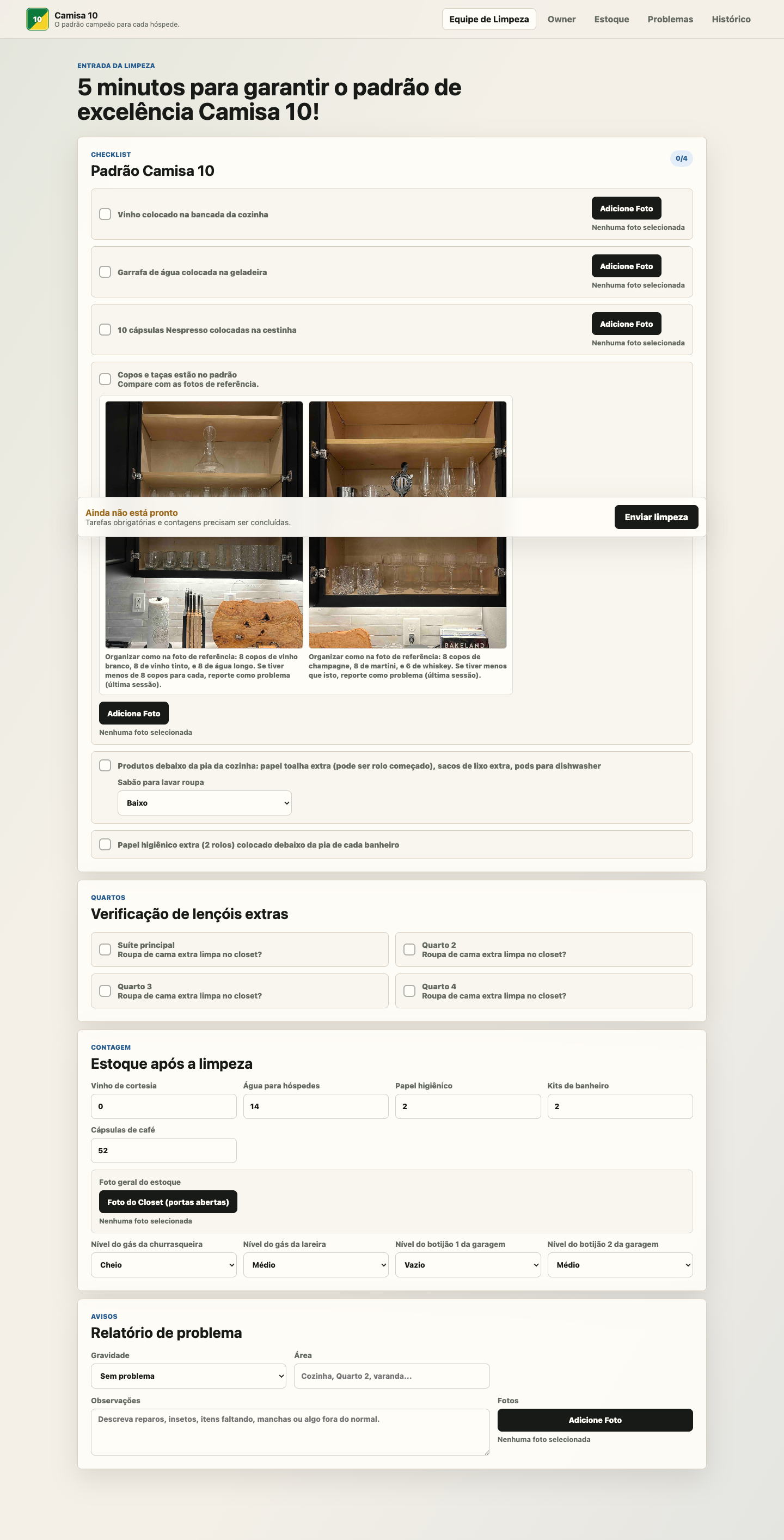 The cleaner flow is deliberately literal: check the item, take the photo, report the exception.
Why this way
I built this with AI as a hands-on collaborator. The product decisions, operational details, naming, and acceptance testing were mine. The code was generated and revised through a back-and-forth process with OpenAI’s Codex: describe the problem, inspect the result, test it, find what felt wrong, adjust the language and structure, then repeat. What mattered wasn’t that AI wrote code quickly. It was that a non-developer could stay close enough to the work to shape the product with specificity.
I scoped the first version around the workflow, not around account management or a generalized property-management product. That kept the build small enough to finish, test, and deploy in one afternoon.
The first prototype was static HTML, CSS, and JavaScript. That was enough to settle the language, section order, proof-photo behavior, inventory categories, and owner dashboard layout. Once the flow felt right, I connected it to Supabase for shared data and photo storage, then deployed it on Netlify.
The stack is intentionally plain: GitHub for source control, Netlify for hosting and DNS, Supabase Postgres for submissions and issues, and Supabase Storage for photos. There is no frontend framework yet. For this app, that was a feature. The hard part was not rendering a complex interface. The hard part was defining a standard that a real person could follow quickly from a phone.
 The phone view matters because the real user is standing in the property, not sitting at a desk.
What broke
The first version only saved data in the browser. That was useful for validating the interface, but useless for real operations because a cleaner’s phone and the owner’s laptop would not share the same records. Moving from local storage to Supabase was the turning point from prototype to usable system.
Photo handling was the main source of friction. Phones make photo capture feel simple, but browsers are less consistent than they look. HEIC support depends on the browser. Large images need preview handling. One test got stuck on “Salvando fotos…” before the app reached Supabase, so I added error handling and a timeout instead of letting the interface hang silently.
Deployment also had its small, ordinary failures. Netlify initially tried to run the GitHub repository URL as a build command. Supabase Storage looked like it was missing from one API check even though the bucket existed in the UI. Storage policies had to be added before photo uploads worked. None of these were conceptually difficult, but each one mattered because this was not a demo anymore. The system had to accept a real submission from a phone and show it somewhere else.
If I rebuilt it from scratch, I would separate configuration from code earlier. The checklist items, stock thresholds, and reference photos should eventually be editable by the owner, not hard-coded. I would also add a simple access layer before wider use: an owner view, a cleaner view, and restricted database policies.
What I learned
The surprising part was not that AI can help build a small app quickly. That is becoming ordinary. The more interesting lesson is that AI makes it possible to treat software as a working surface for operational judgment.
I did not begin with a specification. I began with irritation: forgotten wine, late inventory updates, uneven turnover quality, and too much owner anxiety. The app became useful when those irritations were translated into small, checkable claims: the wine is on the counter, the water is in the fridge, the closet has a photo, the gas is empty, the missing glassware is reported as a problem.
That is the part I want to carry forward. A small app does not need to be ambitious to be meaningful.
Sometimes the highest-value software is just a narrow agreement made visible: this is the standard, this is the evidence, this is what needs attention.